
library(vismi)
vismi(data = newborn, imp_list = imp_newborn, x = "head_circumference_cm",
    y = "weight_kg", z = "sex", verbose = TRUE)
#>
#> ── Sanity checks ───────────────────────────────────────────────────────────────
#> ℹ `household_size`: integer variable detected; treated as numeric for plotting.
#> ℹ `age_months`: integer variable detected; treated as numeric for plotting.
#> ℹ `health`: ordered factor detected; treated as factor for plotting.
#>
#> ── Missing data summary ────────────────────────────────────────────────────────
#> Variable `head_circumference_cm` has 124 missing values.
#> Variable `weight_kg` has 117 missing values.
#> Variable `sex` has 0 missing values.
#>
#>
#> ── Breakdown of missing data patterns ──────────────────────────────────────────
#>                                Variable Count
#> 1                 head_circumference_cm    13
#> 2                             weight_kg     6
#> 3                                   sex     0
#> 4      head_circumference_cm, weight_kg   111
#> 5            head_circumference_cm, sex     0
#> 6                        weight_kg, sex     0
#> 7 head_circumference_cm, weight_kg, sex     0
#>
#> ── Imputed data used for plotting ──────────────────────────────────────────────
#> For each imputed set, a total of 130 observations with missingness in the
#> specified variable `head_circumference_cm`, `weight_kg`, and `sex` are shown.
#> ── Imputed sets selected for plotting ──────────────────────────────────────────
#> Both 'm' and 'imp_idx' are NULL. Using all 5 imputed datasets for plotting.Introduction
This vignette demonstrates how to use the vismi() function from the vismi package to visualise and compare the distributional characteristics of observed and imputed data. The vismi() function can automatically generate suitable static and interactive visualisations for one, two, or three variables, which can be numeric or factor (categorical) variables.
When verbose = TRUE, vismi() will print out the following information in the console:
-
Sanity checks:
This includes a sanity check for the input data and how different types of variables are treated for plotting.
-
Missing data summary:
This provides a summary of the number of missing values in each variable of interest (variables specified in
x,y, andzarguments). -
Breakdown of missing data patterns
This summary shows the breakdown of missingness patterns across the variables of interest (
x,y, andz). In this example, amonghead_circumference_cm,weight_kg, andsex, there are 13 observations missing onlyhead_circumference_cm, 6 observations missing onlyweight_kg, and 111 observations missing in bothhead_circumference_cmandweight_kg. -
Imputed data used for visualisation
This section reports the number of target observations with at least one missing value in the variables of interest (x, y, and z). Only the post-imputed values of these target observations are shown in the
mimputation panels of thevismi()output. We can then compare them with the observed data panel.
Users need to provide the following inputs to vismi():
data: the original incomplete dataset (a data frame or tibble or data table).imp_list: a list of imputed datasets (a list of data frames or tibbles or data tables). This can be obtained usingmixgb()from the mixgb package,mice()from the mice package or any imputation method that generates multiple imputed datasets in a list.x,y,z: the variable names (as strings) to be visualised.xis required, whileyandzare optional. Depending on the number of variables provided,vismi()will generate suitable visualisations.interactive: a logical argument indicating whether to generate an interactive plot (built with plotly) or a static plot (built with ggplot2). Default isFALSE(static plot).other arguments: users can pass on different plot settings. See the documentation of
vismi()for more details.
1D visualisation
1 numeric variable
Static
vismi(data = newborn, imp_list = imp_newborn, x = "head_circumference_cm",
    marginal_x = "box+rug")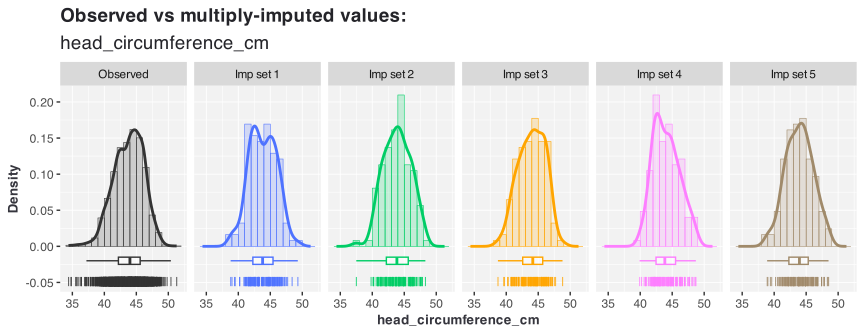
Interactive
vismi(data = newborn, imp_list = imp_newborn, x = "head_circumference_cm",
    interactive = TRUE, marginal_x = "box+rug")
1 factor variable
Static
vismi(data = newborn, imp_list = imp_newborn, x = "smoke")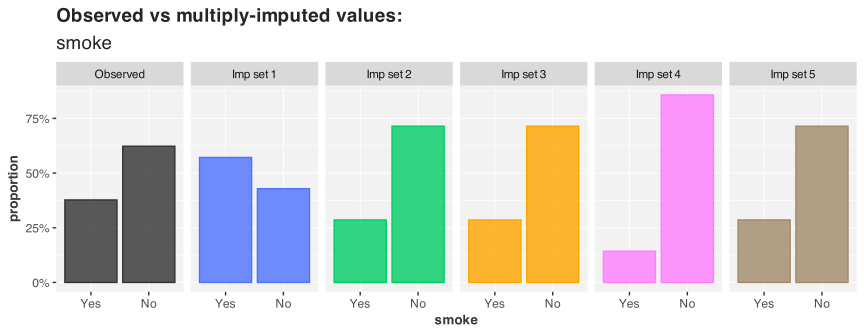
Interactive
vismi(data = newborn, imp_list = imp_newborn, x = "smoke", interactive = TRUE)2D visualisation
2 numeric variables
Static
vismi(data = newborn, imp_list = imp_newborn, x = "head_circumference_cm",
    y = "recumbent_length_cm", marginal_x = "box+rug", marginal_y = "box+rug")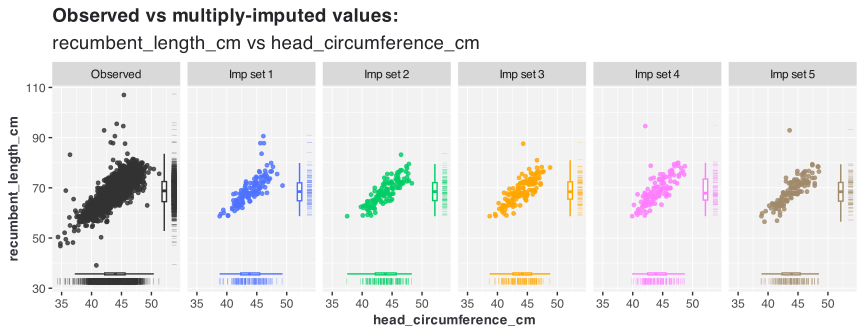
Interactive
vismi(data = newborn, imp_list = imp_newborn, x = "head_circumference_cm",
    y = "recumbent_length_cm", interactive = TRUE, marginal_x = "box+rug",
    marginal_y = "box+rug")
1 factor 1 numeric variable
Static
vismi(data = newborn, imp_list = imp_newborn, x = "recumbent_length_cm",
    y = "sex")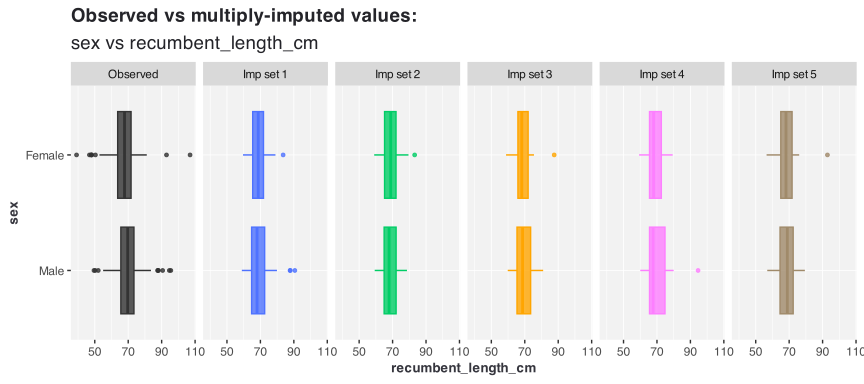
Interactive
vismi(data = newborn, imp_list = imp_newborn, x = "recumbent_length_cm",
    y = "sex", interactive = TRUE)
2 factor variables
Static
vismi(data = newborn, imp_list = imp_newborn, x = "sex", y = "smoke")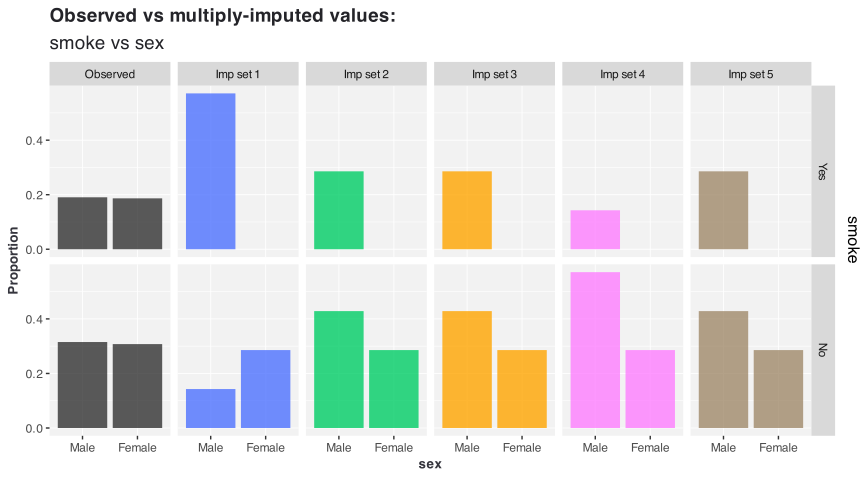
Interactive
vismi(data = newborn, imp_list = imp_newborn, x = "sex", y = "smoke",
    interactive = TRUE)
3D visualisation
3 numeric variables
Static
vismi(data = newborn, imp_list = imp_newborn, x = "recumbent_length_cm",
    y = "head_circumference_cm", z = "weight_kg")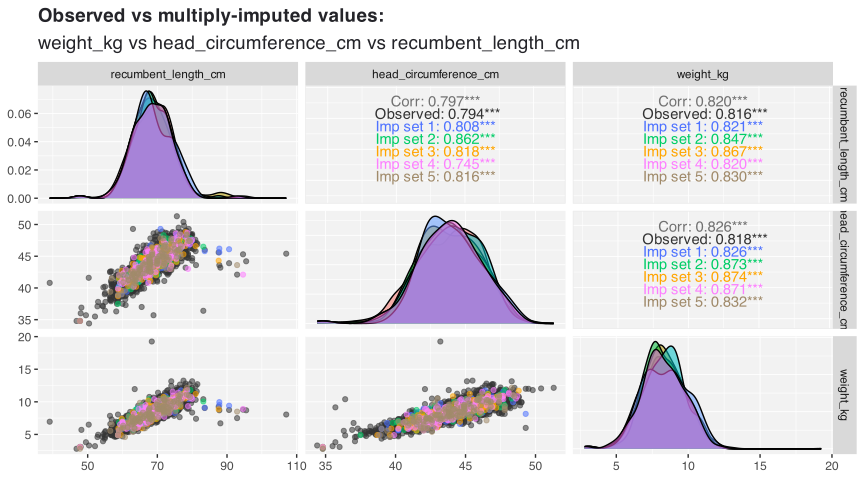
Interactive
vismi(data = newborn, imp_list = imp_newborn, x = "recumbent_length_cm",
    y = "head_circumference_cm", z = "weight_kg", interactive = TRUE,
    point_size = 3)
1 factor 2 numeric variables
Static
vismi(data = newborn, imp_list = imp_newborn, x = "head_circumference_cm",
    y = "smoke", z = "recumbent_length_cm")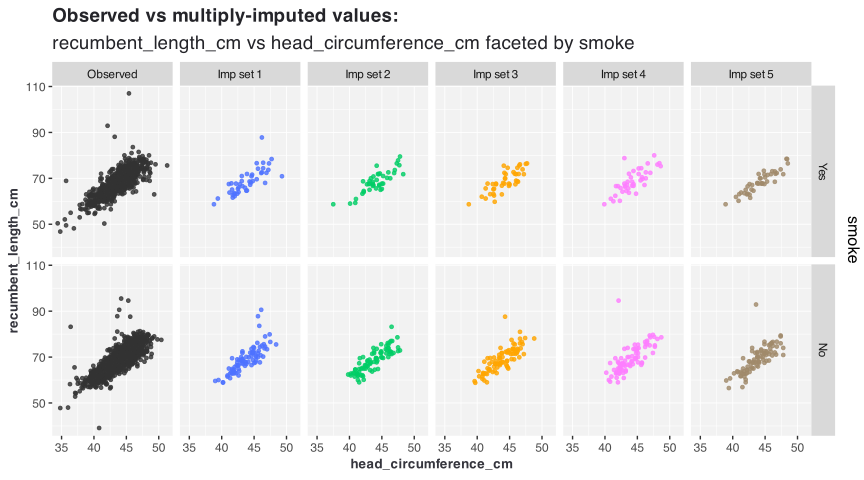
Interactive
vismi(data = newborn, imp_list = imp_newborn, x = "head_circumference_cm",
    y = "smoke", z = "recumbent_length_cm", interactive = TRUE,
    point_size = 3)
2 factor 1 numeric variables
Static
vismi(data = newborn, imp_list = imp_newborn, x = "head_circumference_cm",
    y = "sex", z = "smoke")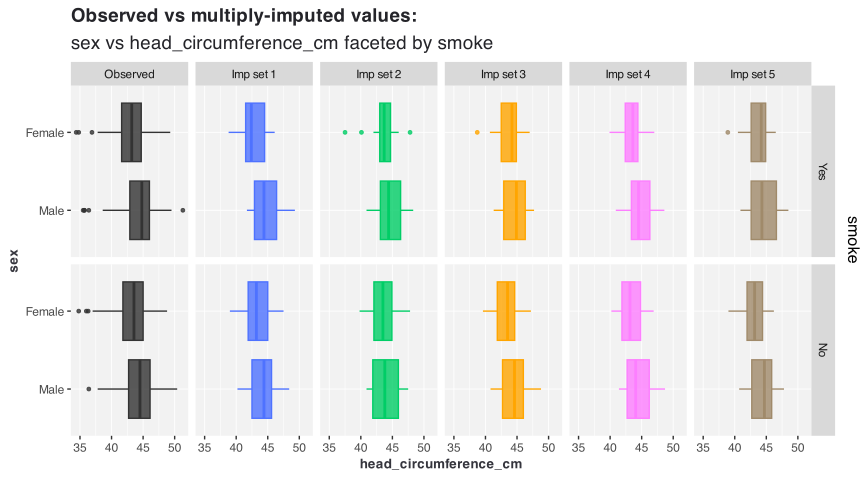
Interactive
vismi(data = newborn, imp_list = imp_newborn, x = "head_circumference_cm",
    y = "sex", z = "smoke", interactive = TRUE, point_size = 3)
3 factor variables
Static
vismi(data = newborn, imp_list = imp_newborn, x = "sex", y = "race",
    z = "smoke")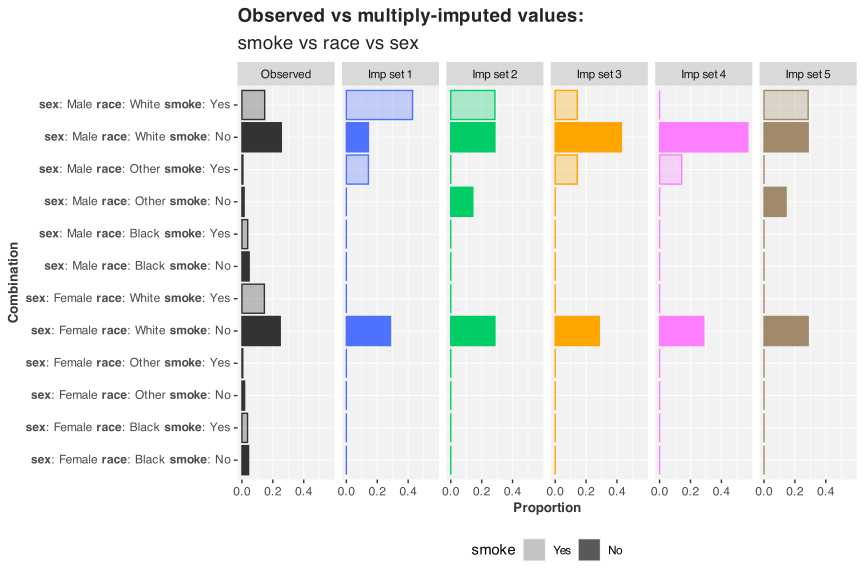
Interactive
vismi(data = newborn, imp_list = imp_newborn, x = "sex", y = "race",
    z = "smoke", interactive = TRUE)